 Documentation


Working with Database Users and Roles
Supported Databases
Database Tour can work with database users in Oracle, PostgreSQL and MySQL databases and roles in Oracle, PostgreSQL, Interbase and Firebird database. In Oracle database, it is also possible to work with database profiles.
In the list of users (and roles for PostgreSQL), the blocked users or roles that cannot log in the database, are shown dimmed.
Notes
- The current database user must have the corresponding permissions to work with these objects.
- In PostgreSQL, user and role are handled as roles.
To work with users, roles, and profiles, use the corresponding tabs of the Object Browser.
Creating Database Users and Roles
To create a user or role from scratch, swicth to the corresponding tab of the Object Browser and click New button  . The new SQL editor will be opened with the skeleton of the object's SQL code. Complete the code and click Execute button
  . If necessary, read the documentation for your database.
Note: After executing your SQL code, if your database is not Oracle and you work in the no auto-commit mode, finish the transaction by clicking Commit button.
Deleting Database Users and Roles
To delete (drop) a user or role, select the needed object in the corresponding list and click Delete button.
To delete several objects, right-click the list and choose Multiple Selection. Then select needed user/role and click Delete button.
Hint: Database users and roles can also be deleted by the corresponding SQL command.
Opening Existing Database Users and Roles
Switch to the corresponding tab of the Object Browser. Locate the needed user or role and select it. This will open a new sub-window displaying the object's properties. Switch to the Script tab to view the DDL code.
Hint: If you double-click the object name in the list, the sub-window will be opened with the Script tab activated.
Editing Existing Database Users and Roles
Open the needed object (see above).
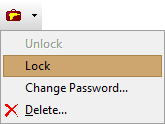
Some properties of the users and roles can be edited from the interface using the Utilities button  on the General tab of the User or Role sub-window. For example, for some database types, it is possible to change user password, block/unblock user, or edit some other attributes.
User menu in MySQL database:
Editing a user in PostgreSQL database:

In the cases when the needed attribute or function are not available in the menu of Utilities button, use SQL. Click New SQL Window button  and write the needed ALTER USER or ALTER ROLE command and execute it. You may want to read your database documentation for details. Example for PostgreSQL:
ALTER ROLE dwh_remote LOGIN CREATEROLE REPLICATIONCloning Database Users and Roles
To clone a user or role, select the needed object in the corresponding list and click Duplicate button above the list. Choose the name for the new object and properties to clone from the old object. You can either create the new object immediately, or generate SQL code for that. In the latter case, you can make changes to the new object; without the changes, in most cases an object identical to the original one will be created.
See also